
I was inspired by some posts on the Lightroom feature request forum to make a nice Automator workflow to automatically generate jpegs in srgb (or any other desired) space from Lightroom. Lightroom's printing panel is very nice but I do not own a >$1000 printer to actually take advantage of it. So, if you could print to something like a jpeg and then send it to a development service that would be great. There were a few examples already noted there but none actually did the essential step of converting to another profile as otherwise you end up with an image in Generic RGB, which will print way to dark from most printing services. So here is a workflow that does that. If you do not see the entire screenshot, make your window wider. There is a larger copy in this link.
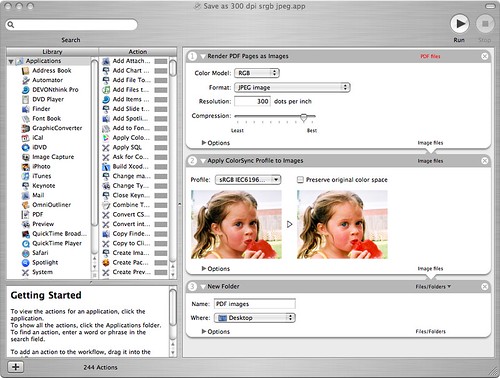
To recreate this, first drag a render pdf as images action into the right part, select color model RGB, format jpg and a high resolution and high quality. Then drag the Apply colorsync profile to images below it, select an sRGB (or any profile you desire, such as maybe a profile supplied by the printing service) profile (there are typically several, it doesn't matter which one you choose). Lastly, drag the New folder action below and set it up as you want. The service will create this folder if it doesn't exist or simply throw the files in the folder if it already exists. Now save the workflow as a plugin for "Print Workflow."
Now, whenever you print, you can simply select this workflow as in the screenshot below
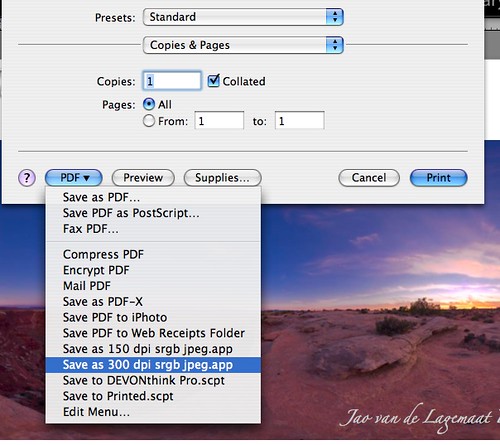
And you'll end up with nice jpg files directly from the Lightroom print module in a usable color space! You can add borders, put multiple images on the page and add your logo!
UPDATE 9/7/07: Apparently, this action might fail if you have enabled FileVault on your machine. If you have that make sure that the folder you export to is outside of your home folder.
UPDATE II: More info here.
UPDATE III: A method to add logos and such to exported images

The image hosted on Flickr for this hint is not public, which is sort of weird.
ReplyDeleteJust FYI.
You're right! My mistake.
ReplyDeleteGreat automator action. I saw this linked from the flickr Lightroom discussion, and it works really nicely. I have been interested in experimenting with frames, and this lets me do just that. Thanks!
ReplyDeleteOK, I think I must be more tired that I imagined. As I can't get my head round
ReplyDelete"I was inspired by some posts on the Lightroom feature request forum to make a nice Automator workflow to automatically generate jpegs in srgb (or any other desired) space from Lightroom."
The sRGB bit isn't making sense, can't you just export to the desired colour space via the export dialog?
Afulki,
ReplyDeletethe idea is to be able to export contact sheets, elaborate compositions of multiple images etc. to jpeg for printing at a printing service. You can also use this method to put borders around images and to include a logo and other info about your photo. The export dialog will not do any of those things.
Thanks for the tip! There are two issues that were not resolved in this tip, though, but which are important to this export workaround.
ReplyDelete1) There does not seem to be a way to name the generated output so I get files with the names like ohgfty.jpg. If I export this way multiple files, it would be quite difficult to manually rename them later. Did you find a way to deal with this?
2) Since it is a print module, you need to specify the size you want to print to. I'd like, however, to be able to export the original file from LR and not the resized version. Photo-hosting companies prefer getting originals so that they could resize them to what's needed in previews and also for prints since these could be ordered in multiple sizes and it is better to resize from the original. Did you deal with this issues?
These are two issues that stop me from using your great tip. Hopefully, you or other readers can provide solutions for these.
Anonymous:
ReplyDelete1) You're right and I do not see an easy method of fixing this. This is an obvious disadvantage of this method and why Adobe should build this into Lightroom, so that we can use the automatic filenaming.
2) Indeed, this tip will give you a resized version of the original at a different resolution. There is no way around this but for using your calculator to make sure the final resolution ends up the same as the original. You will end up with a file that has some output sharpening applied, which can be beneficial and save you a step. Regarding the photohosting sites and printing labs, that is not an issue just as it is not an issue with any other jpeg file. They will print and resize fine. Of course, as always, you have the issues with aspect ratio (like printing a 2x3 ratio file on a 8x10 piece of paper will always involve some cropping or "letterboxing") that are a geometry issue that you also have with directly exported files.
I am in search of a solution to print CONTACT SHEETS directly out of Lightroom, but at a lab like CostCo in the United States. Costco's Frontier machine works best with JPG format; it does not have a RIP, so PDF is not an option.
ReplyDeleteLightroom does not appear to have a way to export Contact Sheets directly to JPG format, (or even be able to export Contact Sheets at all).
If I have a commercial job, similar to one the other day, I generated 217 Contact Sheets, and was forced to use CS2 Contact Sheet II option. Lightroom's print options are far superior to CS2, so I'm looking for a way to use Lightroom, but to be able to generate multiple Contact Sheet files automatically, in a batch.
MT, http://www.marktucker.com
Mark, you can use the exact same tip for contact sheets. Just set up your contact sheets in the normal way and print to the pdf script. The automator script will generate multiple jpegs that you can send directly to costco's. I've done this quite a few times and it works very well. If you're on windows, you can set up adobe acrobat distiller to do exactly the same thing.
ReplyDeleteP.S. I was very impressed by the photographs on your website. Outstanding portfolio there!
Mark,
ReplyDeleteI've just successfully experimented with this method for a couple of contact sheets. I've written a small shell script that will rename them to something sensible as long as there are less than 10,000 of them although you can go more if you want. I'm sure someone more gifted than I could turn it into a nifty AppleScript if they used my script as a specification but in the meantime you're welcome to it if it helps.
Damian
www.damianharty.com
In fact, I've just added the shell script into the Automator routine so now my export plug-in writes the files and then renumbers them sensibly too.
ReplyDeleteDetails on request, please e-mail via the website. It's easy, not in the least bit scary.
Damian
Jao,
ReplyDeleteThanks for the fantastic tip. As a wedding photographer I was previously exporting 500+ images to pdf and then running photoshop actions to convert them back to images. I do this to get contacts printed in a local copy store on a laser and then I get them spiral bound. Now it's so much quicker! I've added a "rename finder item" before the new folder action so they pop out as page_1 etc.
Thanks again!
Hi,
ReplyDeleteThanks for the useful tip. One thing I don't understand though. I installed a costco color profile on my mac and I see it under the color management profiles in the print module(click on "other" to find it). Why wouldn't I just set this here and then only use the automator action to make the jpeg. Is there a reason that the automator needs to do the color conversions?
Thanks,
Chris
Chris,
ReplyDeleteI've tried exactly that and the problem is that the render pdf as image action converts the image to the"generic RGB" color profile no matter what you select as the printer profile in LR. If you send the resulting jpeg to costco, your prints come out too dark. Strangely enough this does not happen if you simply print to pdf from lightroom and then in preview save as jpeg. Unfortunately, if you do that, you get only 72 ppi resolution. There does not seem a way around this but for using acrobat distiller.
A question on the automation piece for Lightroom... How do you control the print size and resulting jpg dimensions? Do you have to install a printer driver that matches the Costco (or other print shop) printer? Do you just have to set up a generic printer and create a paper size to match your desired output?
ReplyDeleteKen,
ReplyDeleteyou need to set up a custom paper size. I show here how to do that. The specific driver that you choose does not seem to matter at all for the resulting jpeg.
Is this action only for MAC..
ReplyDeleteOr can i use it for Windows as well ??
This comment has been removed by a blog administrator.
ReplyDeleteThis comment has been removed by a blog administrator.
ReplyDeleteThis comment has been removed by a blog administrator.
ReplyDeletepixelkeeda,
ReplyDeletethis is mac only, but I think a similar thing can be done on windows by setting up a virtual printer that does this for you. There is something called createPDF that I hear might be able to do it.
Why I deleted a few posts here. In short, annoying viagra spam.
ReplyDeleteAm a new DSLR & Lightroom user. First batches of photos I sent Costco came out exactly as you described dark and unsaturated. Trying to use your Automator Workflow, but it doesn't seem to work for me. I use it from the Print Module of LR, but I can't find where it's saving the file (or if it actually is). I see a progress bar in the upper left of LR, which says it's rendering the image, but it does not go into the folder I specified in Automator. Don't know where it goes, and couldn't find anything, searching the hard drive.
ReplyDeleteJust to confirm, if I understand correctly, what this does is create a JPG file that has been translated into sRGB, which I then send to Costco for printing. However, I don't understand the part about resolution and having to calculate a custom paper size - do I have to specify 4x6?
Superfud,
ReplyDeletethere are at a minimum three things that need to be done to get good print from a printing service.
1. You need to calibrate your monitor, preferably using a hardware calibrator
2. You need to usually submit sRGB pictures
3. You need to make sure the service is not "autocorrecting" your files. Unfortunately this option is often hiddden. Costco now allows you to set it as a preference which is great.
So your best option if you simply want prints from your files in lightroom is to simply use the export module and specify sRGB. No need to go through the printing module. Those files will print perfectly at a place like costco's. There are some subtleties with sharpening and such, but usually those are not critical. Often, you can simply set the export size to 4x6 (if that is your intention) and the resolution to 300 dpi if you want sharp prints from these places.
Now when you use the workflow on this page, you need to first define a costum page size (see here) that has the same height-to-width ratio as your intended print (so if you're printing 4x6's, specify simply 4x6) and has no borders. Now set up your intended prints in Lightroom, including borders, logos, etc. and use the workflow to print. The best is to disable the resolution scaling in Lightroom and simply specify 300 dpi in the workflow. You should get files that print fine from costco, and, if your screen is calibrated, look pretty close to the image on your screen. Just be careful that the longest dimension in your files does not go over 6000 pixels (the limit for the costco website, other sites will accept bigger files), so at 300 dpi, that is 20 inches.
This was exactly what I was looking for - thanks for sharing!
ReplyDeleteNot sure if anyone is still watching this, but I can seem to make the JPEG compression slider do anything. No matter what I set it to, the image is always the same quality and the same size.
ReplyDeleteI use this together with the Mac OS X hint for pushing objects to BlueTooth devices. The result: We can now use our N6233 as digital paper - select print and behold - the result shows up on the phone as a message in the inbox. And so...we from here-on have our electronic flight tickets on our always available mobile phone. Pretty useful if you need to do a check-in at a counter :-)
ReplyDeleteThe link for the object-push hint (note: Separate file for Intel / 10.5 users).
http://www.macosxhints.com/article.php?story=20071010200518755
Thanks for sharing the idea.
Sune - Denmark
Can anyone give step by step instruction to do this on a PC running vista?
ReplyDeleteAnonymous, look into the beta of lightroom 2. It has this built in and works far better and easier than my tip here. http://labs.adobe.com/technologies/lightroom/
ReplyDeleteThis appears to be for a Mac. What do I do if I am working on Windows Vista?
ReplyDeleteAli, you should get Lightroom 2, which has this built in. Version 2.3 is available now
ReplyDeleteI am new at this and I don't understand how you got the first image on this page or where to start from. If it is possible could someone give me directions from the very beginning? Thx
ReplyDeleteStacy,
ReplyDeletethis is all no longer necessary. Lightroom since version 2 supports direct printing to jpeg.